
Every safety net,
in one tool.
Platform capabilities
Every feature your stack needs
One-click restore
Select a backup from the calendar, pick the scope, such as a single record, a full table, or the entire workspace, and click Restore. Backup247 writes the data back to its original location, preserving field types, linked records and attachments. Every restore is logged with a timestamp, a target, and a completion status so nothing happens silently.
Per-resource schedules
You set the backup cadence individually for every base, database or workspace, not as a single account-wide setting. A production CRM base that changes every hour gets hourly backups. A reference table that barely moves gets a daily backup. Retention windows work the same way: keep 365 days of history for the bases that matter and 30 days for everything else.
Backup compare
Before you restore anything, you can diff any two backups side by side. Added records appear in green, modified cells in amber, deleted rows in red, at the field level. This matters because most incidents are not clean deletes. They are overwrites where the data is still there but wrong, and you need to see exactly what changed before you commit.
Browse backups
Every backup is a full, navigable copy of your data at that moment. Open any table, scroll through the records and use the search bar exactly as you would in the live tool, but frozen in time. Useful for answering the question 'what did this record say last Tuesday?' without triggering a restore.
Isolated storage
Backups land in a private bucket with signed-URL access only. Nothing is publicly reachable, and each organisation's storage is isolated at the infrastructure level rather than only behind an application-layer permission check. On Gold plans you can bring your own S3 or R2 bucket instead.
Attachment backups
Files, images and PDFs are captured alongside their parent records in every backup. When you restore a record or table, its attachments restore with it correctly linked, not orphaned in a separate folder. This is the gap most backup tools leave open.
Multiple connectors
Airtable, Notion, Firebase, Podio and Supabase are live today. Slack, HubSpot, Jira, ClickUp and monday.com are on the roadmap. All connectors share the same dashboard, the same diff interface and the same restore flow, so you do not learn a new tool for each integration.
Restore history
Every restore your team has ever triggered is logged in a searchable table: when it happened, which backup was used, which table or base was targeted, which user triggered it, and whether it succeeded or failed. Useful for incident postmortems and for auditing who changed what.
Unified calendar
A single month, week or day view shows every completed backup and every scheduled backup across all your connected tools. A failed or skipped backup shows up as a red indicator on the calendar so nothing goes unnoticed.
Multi-tenant orgs
Invite teammates, assign roles and manage members from the organisation settings. Every organisation's data is fully isolated, so a member of one organisation cannot query or restore data belonging to another, even if they share the same plan.
Row-level security
Every database query Backup247 makes is scoped to your organisation via Postgres row-level security. There is no shared table that could accidentally leak one tenant's backup metadata to another.
OAuth or API key
Connect a new tool in under a minute via OAuth. No API keys to copy, no webhooks to configure. For sources that require an API key rather than OAuth, you can paste the key directly in the connector settings.
Inside the app
Every feature, one dashboard
Schedules, backups, restores and connectors are all surfaced in one place so you never wonder whether a backup actually ran.
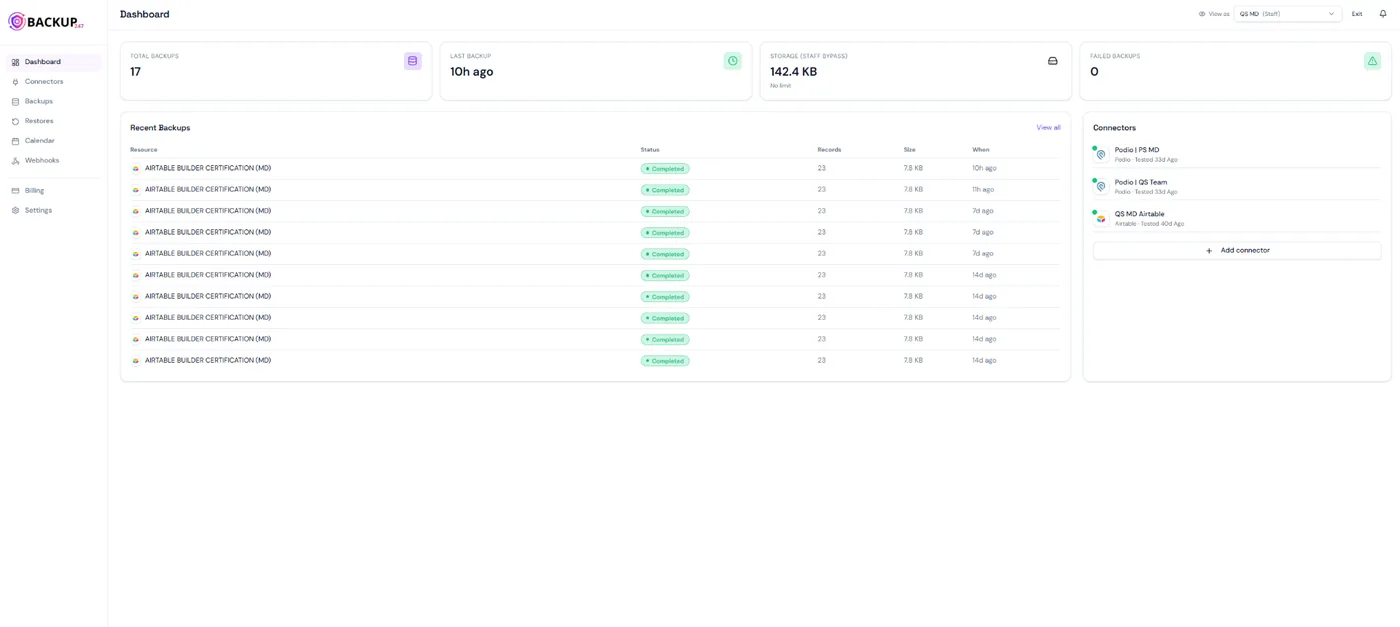
Live health overview
Total backups, last run, storage used and failed jobs across every connected tool.
Recent backups feed
Per resource: records captured, size, status and time, with failures highlighted instantly.
Connectors at a glance
Every workspace you have linked, with last-tested status and one-click add-connector.
Deep dive
Three features people switch tools for
One cadence does not fit every base
A production CRM that takes 200 writes per hour needs a different schedule than a static reference table. With Backup247 you set cadence and retention independently per base, workspace or database. Keep 365 days for the data that matters, 30 days for the rest, and stop paying to store backups you will never restore.
- Hourly on Silver and Gold, daily on Free and Bronze
- Independent retention windows
- Pause individual schedules without disconnecting
See exactly what changed before you restore
Most data incidents are not clean deletes. They are silent overwrites where the records are still there but wrong. Backup247 diffs any two backups field-by-field: added in green, modified in amber, deleted in red. You confirm the change before it is rolled back.
- Field-level diff across any two moments
- Filter by table, user or change type
- Preview the restore impact before committing
Roll back without rebuilding
Pick a backup, choose the scope, such as single record, table or full workspace, and click Restore. Backup247 writes the data back to its original location with field types, linked records and attachments intact. Every restore is logged with who, what and when.
- Restore at field, record, table or workspace level
- Linked records and attachments stay linked
- Full audit log of every restore action
Backup247 vs DIY
What you would otherwise build yourself
A scheduled export script gets you 20% of the way. Diffs, attachments, retention and alerts are the other 80%.
Integrations
One dashboard for your whole cloud stack
Same diff interface, same restore flow and same calendar, no matter which tool the data lives in.
Who it is for
Built for the people responsible when data goes missing
Ops teams
Protect the CRM, project tracker or pipeline that the whole company runs on. Recover from a bad bulk-edit in minutes, not hours of manual fix-ups.
Cloud builders
Ship faster knowing every base your client app reads from is versioned. Roll back a schema change without explaining downtime to your customer.
Agencies and consultants
Manage backups for every client workspace from one dashboard. Hand over restore access without giving up control of the schedule or retention.
Start backing up in 2 minutes
14-day free trial. No credit card. Cancel any time.