
From connect to restore
in under two minutes.
Backup247 sits next to your cloud stack and quietly captures every change. Here is exactly what happens, from the first OAuth handshake to a one-click restore.
The three steps
Set it up once. Forget it forever
Connect
Authorise Backup247 with OAuth for Airtable, Notion or Firebase. No API keys to manage, no webhooks to configure. We request the minimum scopes needed to read your data and write restores back when you ask us to.
Schedule
Pick a cadence per base or workspace: hourly on Silver and Gold, daily on Free and Bronze. Set retention windows independently: keep 365 days for production, 30 days for reference data. The first backup starts immediately so you are protected from minute one.
Sleep
Backup247 takes it from here. Backups run on schedule, attachments are captured alongside records, and a unified calendar shows every backup across every tool. Need to restore? Pick a moment, diff it against today, and roll back in one click.
What you get
One dashboard. Every backup.
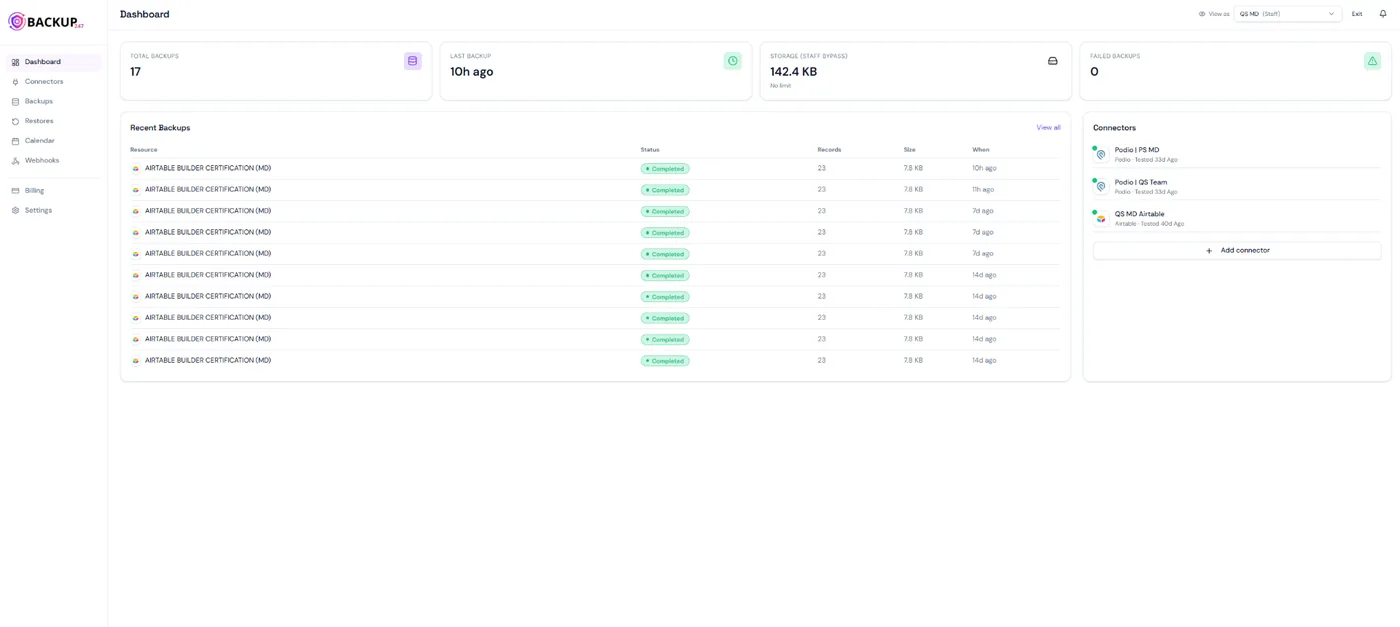
After connect and schedule, this is the view you live in: backup health, recent backups and connector status in a single screen.
Live health overview
Total backups, last run, storage used and failed jobs across every connected tool.
Recent backups feed
Per resource: records captured, size, status and time, with failures highlighted instantly.
Connectors at a glance
Every workspace you have linked, with last-tested status and one-click add-connector.
Behind the scenes
What actually happens during a backup
A backup is more than a database dump. Here is how Backup247 captures, stores and protects each one.
Full backups, not just diffs
Every backup is a complete, queryable copy of your data at that exact moment, including schema, records, linked relations and attachments. You never have to replay a chain of incremental changes to get back to a usable state.
Encrypted at rest and in transit
All backups are written to a private object store with AES-256 at rest, TLS 1.3 in transit and signed-URL access only. Nothing is publicly reachable, even by accident.
Tenant-isolated storage
Each organisation gets its own logically isolated storage path, enforced at the infrastructure layer rather than only behind an application check. On Gold plans you can bring your own S3 or R2 bucket.
Anomaly alerts
If a backup fails, a backup is unexpectedly small, or a sudden mass-delete is detected, we email and notify in-app immediately so a silent failure never costs you a weekend.
Step 1: Pick your tool
Start by choosing what to back up
The first thing you do in Backup247 is pick a source. Each connector knows how to back up structure, data and attachments, and how to restore them safely.
Choose a tool
Select which cloud app you want to back up.
Need another tool?
Continue with AirtableLifecycle of a backup
Six things happen, every single backup
Trigger
Scheduled cron fires, or you click Run now.
Capture
We page through the API, capturing schema, records and attachments in parallel.
Encrypt & store
Backup is compressed, encrypted, and written to your tenant-isolated bucket.
Index
Indexed for fast browse, search and diff against any prior backup.
Verify
Integrity check runs against the manifest; any drift triggers an alert.
Available
The backup appears on your calendar, ready to browse or restore.
Security
Your data, your boundaries
Backup247 is built so that a worst-case incident on our side cannot become a worst-case incident on yours. Every layer assumes the next one might fail.
- OAuth scopes limited to read + write-back on demand
- Row-level security on every Postgres query
- AES-256 encryption at rest, TLS 1.3 in transit
- Private buckets, signed-URL access only
- Bring your own S3 or R2 bucket on Gold plans
- Full audit log of every restore and member action
FAQ
Common questions
How long does the first backup take?
For most Airtable or Notion workspaces, the first full backup completes in 2 to 10 minutes. Subsequent backups are usually faster because we parallelise the capture across tables.
What happens if a scheduled backup fails?
We automatically retry with exponential backoff. If it still fails, you get an email and an in-app alert with the exact reason, such as expired OAuth, rate limit or schema change.
Can I restore a single record instead of a whole table?
Yes. Restores work at any level: single field, single record, full table, or the entire workspace. You pick the scope before confirming.
Are attachments included?
Yes. Files, images and PDFs attached to records are captured in the same backup and restore correctly linked, not as orphans.
Do you store my data forever?
Only as long as your retention window says. After that, backups are permanently deleted. You set the window per resource.
Start backing up in 2 minutes
14-day free trial. No credit card. Cancel any time.